Beta by request
Plan your AV installation. Down to the last cable.
Design your connections, check that your installation holds together, and prepare the documents your team needs.

- 01
Real ports
Every socket comes from the device’s catalogue entry: connector, direction, signal family. A network port also carries its VLAN.Every socket comes from the device’s catalogue entry.
- 02
Labelled cables
Type, length and resolution carried by the cable: SDI/BNC · 25 m · 1080p50, HDMI · 10 m · 1080p50, Cat6 · 3 m.Type and length carried by the cable: SDI/BNC · 25 m.
- 03
A catalogue entry behind every device
Ports, power, weight and sources come from the catalogue: 2,930 models, 158 manufacturers, figures calculated at publication.Ports, power and weight come from the catalogue: 2,930 models, 158 manufacturers.
What PatchFlow takes care of
You draw. PatchFlow does the maths.
The canvas is where you make your choices. The calculations, the checks and the documents are PatchFlow’s job.
You place a device, you run a cable: its catalogue entry comes with it, the watts add up, the PoE budget updates, the lengths accumulate, the documents rewrite themselves. No spreadsheet to keep in step — you decide, the project follows.
- 01
You place a device
It arrives with its real ports, its power, its weight and its footprint, taken from its catalogue entry. Nothing to retype, no manufacturer PDF to dig through.
- 02
You run a cable
Loads in watts and amps add up, the switch’s PoE budget updates, the resolution propagates along the video chain, the length is written on the link.
- 03
You change your mind
Move a device to another circuit, swap a model, remove a camera: the calculations, the diagnostics and the documents redo themselves.
The canvas is the interface. The work is what sits behind it.
One project, five readings
One installation, several connected domains
Sound, video, network, power and lighting live in the same project. Each layer shows what concerns one trade; the whole stays consistent because a device, its ports and its cables exist only once.
Sound
Wireless mics → console → amplifier → speakers, over XLR, Dante and NL4. The amplifier’s load is calculated from the speakers actually connected, not from its nameplate.Wireless mics → console → amplifier → speakers, over XLR, Dante and NL4. The amplifier’s load comes from the speakers actually connected.
Video
Cameras → mixer → recorder and converter → projector, over 3G-SDI, 12G-SDI and HDMI, with the length of every cable.Cameras → mixer → recorder and converter → projector, over 3G-SDI, 12G-SDI and HDMI.
Network
NDI cameras, Dante, amplifier and projector on the same PoE+ switch: ports, VLANs and IP addressing are planned on the same drawing.NDI cameras, Dante, amplifier and projector on the same PoE+ switch: ports, VLANs, IP addressing.
Power
Every device is connected to a socket or a power strip; the load adds up in watts and amps at the project’s voltage.Every device is connected to a socket or a power strip; the load adds up in watts and amps.
Lighting
DMX node and fixtures: DMX universes and addresses, fixture mains, on their own layer.DMX node and fixtures: universes, DMX addresses, fixture mains.

Diagnostics
Catch an inconsistency before the build
PatchFlow checks the project while you draw it: compatible connectors, electrical loads, cable gauge, PoE budget, video resolutions, DMX addresses. Every diagnostic names the device concerned, explains the problem and, when a fix exists, offers it.
The checks are based on what the catalogue entries describe and on the project’s own data.

- Critical · Control room power strip: overloaded — 2712 W / 2300 W max
- Critical · Control room socket — T13 10 A: overloaded — 2712 W / 2300 W max → Spread the devices over several sources

The checks are based on what the catalogue entries describe and on the project’s own data.
The catalogue
Modelling reality, device by device
A plan is only as good as its catalogue entries.
Every device in the catalogue carries its real ports — type, direction, connector, signal —, its power, its footprint and its weight. Everything PatchFlow calculates, checks and prints rests on that data: this is where most of our work goes.
- models on file
- 2,930
- manufacturers
- 158
- categories
- 59
- ports described
- 32,933
Figures calculated when this page was published, from the catalogue shipped with the application.
We work with manufacturers so that their devices are represented as accurately as possible: official documents, dimensions, connectors, photos.
Every entry carries its verification status and the list of its sources — 2,515 entries cite at least one. None is announced as “verified” until it is.Every entry carries its verification status and its sources — 2,515 entries cite at least one. None is announced as “verified” until it is.
An undocumented value stays empty and shows “—”. It is never replaced by a default value, which would skew the calculations without saying so.
Where no manufacturer datasheet exists, a generic template takes the characteristics of an equivalent product on the market. Those values are marked as estimated.
Our goal: that the installation built matches exactly the plan prepared.
Do you make this equipment? → Manufacturers pageDeliverables
Prepare the equipment and the documents
The cabling plan, the equipment list, the labels and the report all come out of the same project. Nothing is retyped: what is drawn is what gets printed.


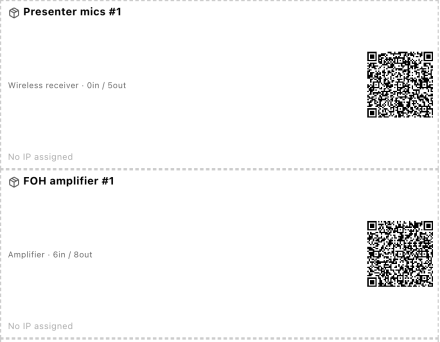

Also exported from the project
- Project reportsummary, inventory, cabling plan, power summary
- Device inventoryquantities and weights; unknown weight = “—”
- Cable labelsA4 sheet printed to scale
- IP addressing reportIP plan, VLANs, port groups
- Console patchconsole inputs and outputs
- Lighting patchuniverses, addresses, fixtures
- Console patch · lighting patchinputs/outputs; universes and addresses
- Cable trunk reportcable distribution by trunk and by compartment
- Quoteproject items, editable prices
And other reports, depending on the project.
On site
From preparation to the field
On site, the team follows the project live on their phones. No account, no install: every device, its cables, and the preparation to tick off.

Local sharing
from the application
Technicians follow the project live on their phones.
Cloud
separate service
Accounts, seats and project synchronisation between workstations. Opening, editing and checking a project does not depend on it.
Live
in development
Connecting the project to the installation once it is built, to compare what is planned with what is in service. In development: see the Live page.
Three situations
The same project, three kinds of job
Concert / festival
A stage, a PA system, front-of-house and monitor positions, a wireless rig and a lighting control position, all built in a day.
- Power summary drawn up before the build: power per feed, cable gauge, voltage drop over long runs.
- Console patch and lighting plan prepared in advance: inputs and outputs, DMX universes and addresses.
Conference / recording
Two cameras, a mixer, a recorder, a projection and wireless mics: everything goes through the same switch.
- Video chain readable from camera to screen, with the effective resolution at every stage.
- IP addressing and the switch’s PoE budget planned before arriving on site.
AV installation
A fitted-out room to hand over with its documentation: racks, IP addressing, internal patch.
- Front and rear rack views, internal patch and cable labelling prepared before the job.
- Handover pack: cabling plan, IP addressing report and inventory delivered to the client.
Request beta access
The beta is joined by request. Tell us what you do and the kind of projects you prepare: every request gets an answer at the address given.