The software
Design, check, prepare, share.
PatchFlow follows the order of a project: you draw the system, you check it, you prepare the equipment and the documents, then you take it into the field.
The canvas is the interface. The work is what sits behind it.
01 · Design
The project is made of real devices
What is drawn is what gets plugged in.
The project’s devices are placed, their ports connected, the drawing organised like the room. The catalogue provides each device’s entry: ports, power, footprint. No data is entered twice.

Every device comes from a catalogue entry: 2,930 models, 158 manufacturers, 59 categories — figures calculated at publication.
The ports offered are the ones on the entry, not a generic list: 32,933 ports described. A cable can only be run between two compatible ports.The ports offered are the ones on the entry: 32,933 ports described. A cable can only be run between two compatible ports.
Five trade layers — sound, video, network, power, lighting — in a single project. Hiding a layer duplicates nothing: a device, its ports and its cables exist only once.Five trade layers in a single project. Hiding a layer duplicates nothing.
Where no manufacturer datasheet exists, a generic template takes the characteristics of an equivalent product on the market; those values are marked as estimated and the entry stays editable.Where no manufacturer datasheet exists, a generic template takes the characteristics of an equivalent product on the market; those values are marked as estimated.
A floor plan — image or PDF — sits under the canvas and is scaled to the venue; cable lengths are measured on it.A floor plan — image or PDF — is scaled to the venue; cable lengths are measured on it.
02 · Check
Diagnostics
A preparation mistake shows up at the desk, not when the truck is unloaded.
PatchFlow checks the project while you draw it. Every diagnostic names the device concerned, cites the rule applied and, when a fix exists, offers it.

Four levels — information, warning, error, critical — and a counter always visible in the status bar.
Every diagnostic names the device, cites the rule applied and, when a fix exists, offers it.
Checked today: connector compatibility, load on sources and power strips, cable gauge, voltage drop, switch PoE budgets, effective video resolution along a chain, speaker line load and impedance, DMX addresses and universes.Checked today: connectors, load on sources and power strips, cable gauge, voltage drop, PoE budget, effective video resolution, speaker lines, DMX addresses and universes.
An unknown value stays empty: PatchFlow reports missing data rather than calculating with a zero.
See the checks in detailHide the detail of the checks
- Power
- source and power-strip overload · cable current and gauge · single and cumulative voltage drop · incompatible mains connectors · missing electrical data
- Network
- PoE budget per switch · duplicate or out-of-plan IP addresses · VLANs
- Video
- resolution not supported by a port · effective resolution after an extender or a converter
- Sound
- load and impedance per speaker line · incompatible connectors
- Cabling
- port used twice · device with no connection at all · incompatible connector or signal
- Lighting
- DMX address conflicting or out of range · universe overloaded or with no source · fixture not patched · DMX node with no network
03 · Prepare
The equipment and the documents
Loading is done from a list produced by the project, not from memory.
The cabling plan, the equipment list, the labels and the reports all come out of the same project. Nothing is retyped: what is drawn is what gets printed.The cabling plan, the equipment list, the labels and the reports all come out of the same project. Nothing is retyped.
Equipment list: the models to load, the cables grouped by type and length, with a spare margin.Equipment list: models to load, cables grouped by type and length, with a spare margin.
Labels: sheets at real size, with a QR code that links to the device’s entry; printed to scale.Labels: sheets at real size, with a QR code to the entry, printed to scale.
Rack view: the inside of the flight case, front and rear, read from the bottom as on paper.Rack view: the inside of the flight case, front and rear.
Documents: project report, device inventory, IP addressing report, console patch, lighting patch, cable trunk report, quote — and other reports, depending on the project.Documents: project report, inventory, IP addressing, console patch, lighting patch, cable trunk report, quote — and other reports, depending on the project.


04 · Run and share
The project in the field
The team reads the same project as you, on their phones.
On site, technicians follow the project live on their phones. No account, no install: the devices, their cables and the preparation to tick off.

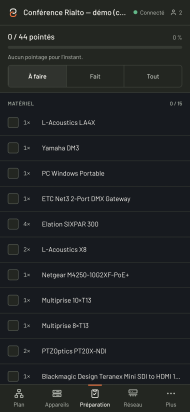
Local sharing, from the application: technicians follow the project live on their phones.
Check-off: every device and every cable is ticked as it is installed; progress is visible to the whole team.Check-off: every device and every cable is ticked as it is installed.
Cloud, a separate service: accounts, seats and project synchronisation between workstations. Opening, editing and checking a project does not depend on it.Cloud, a separate service: accounts, seats, synchronisation. Opening and checking a project does not depend on it.
Live, in development: connecting the project to the installation once it is built, to compare what is planned with what is in service. Details on the Live page.